
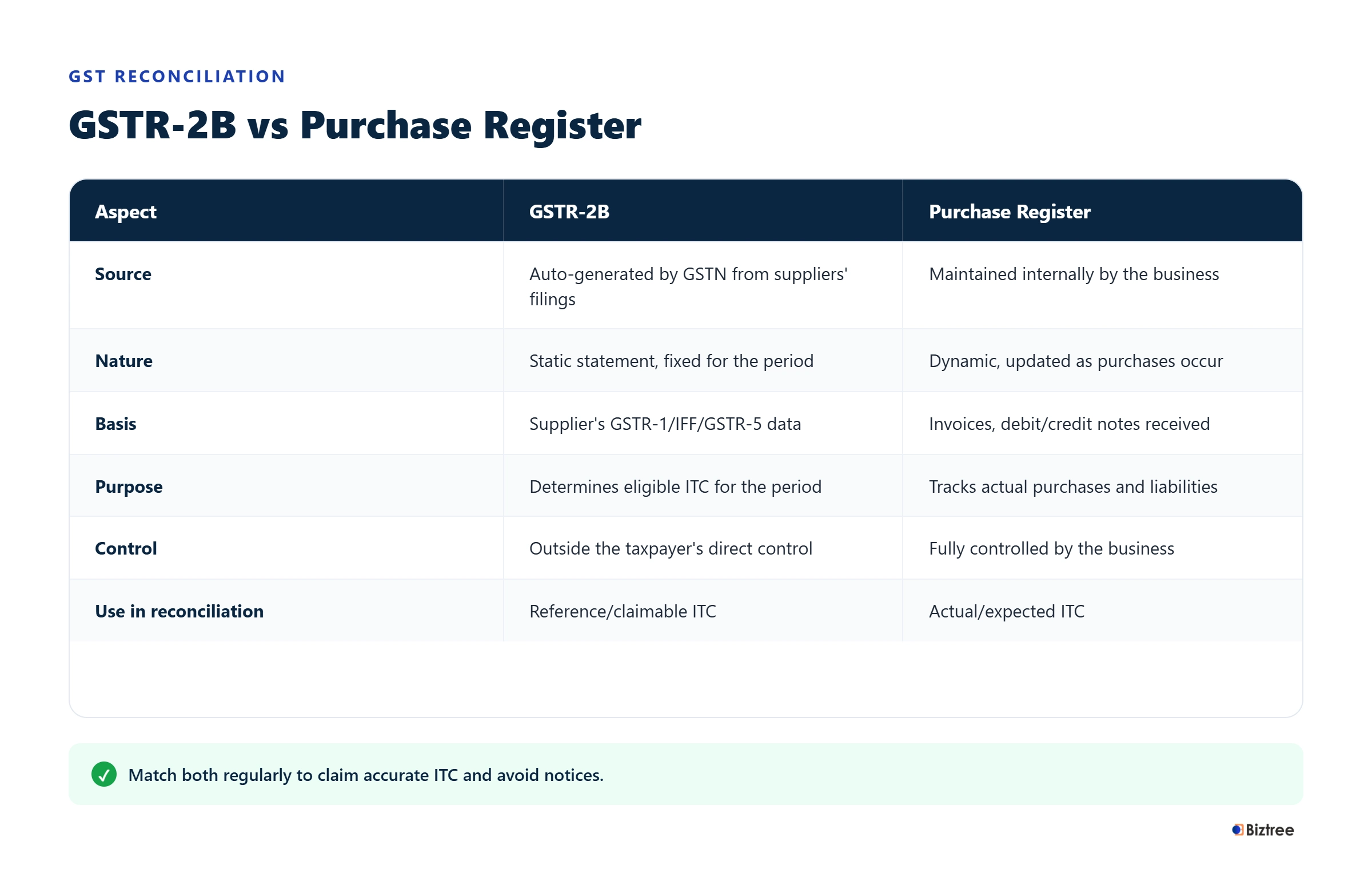
Quick Answer: GSTR-2B is a system-generated statement of ITC-related invoice information based on what your suppliers report to the GST portal. Your purchase register is the record of purchases your own books maintain. The two rarely match exactly, because supplier filing delays, GSTIN errors, invoice-formatting differences and timing gaps get in the way. To reconcile them, match each invoice on supplier GSTIN, invoice number, invoice date, taxable value and tax amount, then sort the results into exact matches, partial matches, GSTR-2B-only entries and purchase-register-only entries. Every mismatch needs to be investigated before you decide what ITC to claim — a match in GSTR-2B does not by itself confirm the credit is eligible.
Disclaimer: This article reflects GST law, ITC rules and GSTR-2B/GST portal functionality as understood up to 18 August 2026, based on GSTN and CBIC guidance current as of that date. GST rules, forms and portal features are amended periodically — verify current provisions on the GST portal (gst.gov.in) or with CBIC (cbic-gst.gov.in) before relying on this for compliance decisions.
What Is GSTR-2B?
GSTR-2B is an auto-drafted, system-generated ITC statement. It’s built primarily from what your suppliers report through their own GST filings, and it’s meant to give you a structured basis for reviewing input tax credit before you file your return.
It is not your accounting record. Your purchase register is compiled from your own books; GSTR-2B is compiled from the GST system. That single distinction is the reason reconciliation exists at all — one side reflects what your suppliers have told the government, the other reflects what your business has actually recorded.
GSTR-2B vs Purchase Register: What Is the Difference?
| Particular | GSTR-2B | Purchase Register |
| Source | GST system, built from supplier filings | Your accounting records |
| Controlled by | GSTN and your suppliers | Your finance/accounting team |
| Nature | Generated for a defined period, largely static after generation | Updated continuously as transactions occur |
| Purpose | Basis for reviewing eligible ITC | Record of what your business has purchased |
| Reconciliation required | Yes | Yes |
GSTN advises taxpayers to reconcile GSTR-2B against their own books, precisely so ITC isn’t claimed twice or claimed where a reversal applies.
Why Does GSTR-2B Not Match the Purchase Register?
A mismatch usually comes down to one of these:
- Supplier hasn’t filed the invoice yet, or filed it in a different tax period
- GSTIN entered incorrectly on either side
- Invoice number recorded differently (formatting, leading zeros, special characters)
- Invoice date doesn’t line up
- Taxable value or tax amount differs
- A credit or debit note wasn’t accounted for
- An invoice was booked twice in the purchase register
- An invoice sits in GSTR-2B but was never entered in your books, or vice versa
GSTN’s own matching tool sorts results into exact match, partial match, probable match and mismatch — including invoices present only in GSTR-2B and invoices present only in the purchase register. That’s the same logic this article walks you through manually or in Excel.
GSTR-2B Generation Date: When Should You Reconcile?
For monthly filers, GSTR-2B is generally generated on the 14th of the following month. For quarterly filers, it’s generated quarterly, also around the 14th of the month after the quarter ends. Don’t treat the 14th as “download and claim whatever number shows up.” Under the Invoice Management System (IMS), actions you take on the portal after the draft GSTR-2B is generated — accepting, rejecting or marking pending on individual invoices — can trigger a recomputation before you file GSTR-3B. Treat the generation date as a checkpoint to start reconciling, not a signal that the number is final.
GSTR-2B Rules Businesses Should Understand
A few rules shape how reconciliation actually plays out:
- GSTR-2B is built from what’s furnished by suppliers (and other relevant sources) as of the cut-off for that period.
- It’s largely static once generated for that period — GSTR-2A, by contrast, keeps changing as filings come in.
- An invoice dated in one month can still land in a later GSTR-2B if the supplier reports it late. The invoice date and the period it appears in aren’t the same thing.
- GSTN’s guidance is explicit that GSTR-2B should be reconciled against your own books — it isn’t meant to be taken at face value. The GST portal’s own GSTR-2B FAQ documentation confirms this directly, along with the generation-date and cut-off logic covered above.
- Appearing in GSTR-2B is not the only condition for claiming ITC. CBIC’s input tax credit rules set out separate documentary and eligibility conditions that still apply — see Step 11 below.
GSTR-2A vs GSTR-2B: What Is the Difference?
| Factor | GSTR-2A | GSTR-2B |
| Nature | Dynamic, keeps changing | Static for the period once generated |
| Main use | Reference view of supplier-reported data | ITC review and reconciliation |
| Updates | Changes as suppliers amend or file late | Fixed snapshot for a defined period |
| Reconciliation relevance | Useful for historical cross-checking | The statement you reconcile against for current-period ITC |
GSTR-2A hasn’t gone away — GSTN’s IMS FAQs confirm it continues to be generated alongside GSTR-2B. For reconciliation purposes, though, GSTR-2B is the one that matters for the period you’re actually filing.
How to Reconcile GSTR-2B with Purchase Register Step by Step
Step 1 — Finalise the Purchase Register
Before you compare anything, your purchase register needs to be clean: supplier name, GSTIN, invoice number, invoice date, taxable value, IGST/CGST/SGST, total value, and any credit or debit notes. Reconciling against a register with obvious duplicates or gaps just wastes the exercise — fix the source first.
Step 2 — Download the Relevant GSTR-2B
Pull GSTR-2B for the specific period from the GST portal. Use the download format that fits your reconciliation process — Excel-based matching works fine for smaller volumes.
Step 3 — Check the Tax Period
Don’t compare June’s purchase register against July’s GSTR-2B and call every gap a mismatch. If a supplier reported late, that invoice may land in a later GSTR-2B than the invoice date suggests. Confirm which period you’re actually looking at before flagging anything.
Step 4 — Match Supplier GSTIN
GSTIN is your most reliable matching key. If GSTR-2B shows 27ABCDE1234F1Z5 and your purchase register shows something different for the same supplier, chase that down before assuming the invoice itself is missing — it’s often a data-entry issue, not a filing issue.
Step 5 — Match Invoice Number
Watch for formatting differences that make the same invoice look like two different ones: INV-001 vs INV001, INV/24-25/001 vs 001, stray spaces, leading zeros. These cause false mismatches more often than actual missing invoices do.
Step 6 — Match Invoice Date
Dates can drift for mundane reasons — a manual entry slip, how your accounting software formats dates, or a supplier amendment. Don’t reject a record on a date mismatch alone; pull the source invoice and check.
Step 7 — Compare Taxable Value and Tax
Now check taxable value, IGST, CGST, SGST/UTGST and cess. An invoice can match on GSTIN and invoice number and still be wrong on the numbers — that’s a partial match, not a clean one.
Step 8 — Classify the Differences
Once you’ve run the comparison, sort every invoice into one bucket. This is the part accountants tend to skip, and it’s the part that actually makes the reconciliation usable:
| Reconciliation Result | What It Means | What To Do |
| Exact Match | GSTIN, invoice number, date, taxable value and tax all agree | Move to ITC eligibility check |
| Partial Match | Invoice exists on both sides but one or more fields differ | Pull the original tax invoice, compare against both records |
| GSTR-2B Only | Invoice appears in GSTR-2B but isn’t in your books | Check whether the purchase was missed or booked elsewhere |
| Purchase Register Only | Invoice is in your books but absent from GSTR-2B | Check supplier’s filing status and the timing of their return |
| Duplicate | Same invoice appears more than once in either record | Identify the genuine transaction, remove the duplicate |
Step 9 — Contact the Supplier
For anything in the “Purchase Register Only” or “Partial Match” bucket, go back to the supplier. Ask them to confirm GSTIN, invoice number, invoice date, taxable value, tax amount, and the period they filed it in. This resolves recurring gaps faster than repeated internal investigation.
Step 10 — Reconcile Again
If the supplier corrects something, or you take an action on the IMS portal, re-check the numbers. A reconciliation done once at the start of the month and never revisited misses corrections that land later, before you actually file GSTR-3B.
Step 11 — Check ITC Eligibility
A matched invoice is not automatically an eligible credit. This is worth separating out clearly:
Matching question: Does this transaction appear correctly in both records?
ITC eligibility question: Can this business legally claim the credit? Even an exact match still needs a check against CBIC’s ITC conditions — genuine business use, valid documentation, no applicable block or reversal, correct treatment if reverse charge applies. Rule 36 of the CGST Rules sets out the documentary conditions in full, including the requirement that ITC on an invoice or debit note can only be availed once it’s been communicated in GSTR-2B. Equally, an invoice missing from this month’s GSTR-2B shouldn’t be written off as unclaimable; it may simply be filed late and show up next period.
A worked example
Purchase register: 100 invoices, taxable value ₹10,00,000, GST ₹1,80,000. GSTR-2B: 94 matching invoices, GST ₹1,65,000. Gap: ₹15,000.
That gap doesn’t tell you anything on its own — six invoices need to be traced individually. Say two of them show a supplier who hasn’t filed yet, three show a GSTIN typo in the purchase register, and one is a genuine duplicate entry booked twice by mistake. Each of those gets resolved differently: the unfiled ones go on a supplier follow-up list, the typo gets corrected in the books, and the duplicate gets removed from the reconciliation total. None of them get written off as “lost ITC” without that check.
A second scenario worth knowing: supplier GSTIN matches, invoice number matches, but the taxable value in your purchase register reads ₹1,00,000 while GSTR-2B shows ₹99,500, and GST differs by a proportional amount. This is a partial match, not a mismatch. Pull the original invoice — the actual figure the supplier issued — and check which side is wrong. It’s frequently a rounding or an amendment the supplier filed that hasn’t been reflected in your books yet.
How to Match GSTR-2B With Purchase Register in Excel
For smaller volumes, two sheets and a lookup formula are enough. Set up matching columns — GSTIN, Invoice Number, Invoice Date, Taxable Value, IGST, CGST, SGST — identically on both sheets.
Build a matching key by concatenating GSTIN and invoice number, e.g. =A2&B2, on both sheets. Then use XLOOKUP (or VLOOKUP/INDEX-MATCH on older Excel versions) against that key to pull the corresponding GSTR-2B row next to each purchase register row, and flag differences with a simple IF comparison on taxable value and tax columns.
This works fine up to a few hundred invoices a month. Beyond that, manual spreadsheet matching starts eating disproportionate time, and a structured accounting workflow — where reconciliation is built into monthly close rather than done as a one-off — reduces that repetitive load considerably. If your team is spending real hours every month cleaning purchase data and chasing supplier mismatches by hand, a proper bookkeeping and accounting services setup is usually the more durable fix than a bigger spreadsheet.
GSTR-2B in TallyPrime: What Businesses Should Know
If you run TallyPrime, don’t treat the purchase register it generates as interchangeable with GSTR-2B — one is your books, the other is the GST portal’s record. The conceptual workflow stays the same regardless of software:
TallyPrime purchase data → export/review → GSTR-2B data from the portal → match on GSTIN, invoice number, date and value → investigate differences → separate ITC eligibility check.
The exact export steps depend on your TallyPrime version and configuration, so this isn’t a substitute for checking your specific release’s documentation. The reconciliation logic above applies whether the source data comes from TallyPrime, Zoho Books, or any other system.
Common GSTR-2B Reconciliation Mistakes
- Matching only on invoice number. Formatting differences create false negatives; GSTIN plus invoice number is a stronger key.
- Ignoring GSTIN as a first check. A GSTIN typo can make a perfectly valid invoice look “missing.”
- Treating every missing invoice as a supplier error. Sometimes it’s a timing gap or an internal booking issue, not a filing failure.
- Claiming ITC solely because an invoice appears in GSTR-2B. Appearing in the statement isn’t the same as meeting eligibility conditions.
- Ignoring credit and debit notes. These change the net ITC position and get missed when reconciliation focuses only on original invoices.
- Not checking for duplicate purchase entries. Duplicates inflate your register and manufacture a mismatch that doesn’t actually exist.
- Comparing the wrong tax periods. Late supplier filing shifts an invoice into a later GSTR-2B — check the period before flagging a gap.
- Reconciling only at year-end. Supplier follow-up gets much harder months after the transaction.
Treating GSTR-2A and GSTR-2B as identical. They serve different purposes and behave differently.
GSTR-2B Reconciliation Checklist
Correct tax period selected
Purchase register finalised and duplicate-checked
GSTR-2B downloaded for the period
Supplier GSTIN matched
Invoice numbers matched
Invoice dates checked
Taxable value and tax amounts compared
Credit/debit notes reviewed
GSTR-2B-only invoices investigated
Purchase-register-only invoices investigated
Supplier follow-up sent where needed
Reconciliation re-run after corrections
ITC eligibility reviewed separately from matching
Final ITC figures confirmed before GSTR-3B
How Often Should Businesses Reconcile GSTR-2B?
Monthly is more workable than year-end for most businesses. It surfaces missing invoices, GSTIN errors and duplicate entries while the transaction is still fresh enough to trace, and it gives suppliers more runway to correct their filings before the gap compounds across several periods.
What If GSTR-2B and Purchase Register Still Don’t Match?
Don’t force the two numbers to agree — a persistent gap is a signal to keep investigating, not a problem to paper over. Work through it in sequence: identify the invoice, determine the likely reason, verify against the source document, contact the supplier if needed, check whether it shows up in a later GSTR-2B, then assess eligibility separately. What you’re building isn’t two identical reports — it’s a reconciliation trail that explains why any residual difference exists and how you arrived at the final ITC figure.
Can Accounting Software Help With GSTR-2B Reconciliation?
Software reduces the manual load, but the real question isn’t whether a tool has a “GST” label — it’s whether it keeps GSTIN and invoice-level data clean, exports cleanly for matching, and lets you track corrections over time. For businesses running Zoho Books or evaluating a move to it, this matters more than feature lists. If you’re weighing implementation, configuration or migration support, Biztree’s Zoho Finance services cover setup and ongoing support specifically for that.
GSTR-2B Reconciliation and GST Compliance
Reconciliation works best as part of a recurring cycle, not a one-off task: purchase recording → supplier invoice verification → GSTR-2B review → reconciliation → ITC eligibility review → GSTR-3B preparation. As transaction volume grows, errors get harder to spot without that structure in place — which is also the point at which formal GST registration in Pune and ongoing compliance support tend to become worth setting up properly rather than managing ad hoc.
Note on filing terminology: GSTR-2B itself is not something you separately “file.” It’s generated automatically by the GST system, and the eligible ITC it reflects is what you carry into your GSTR-3B preparation — there’s no standalone GSTR-2B filing step.
GSTR-2B vs Purchase Register: The Bottom Line
The purchase register tells you what your business recorded as purchases. GSTR-2B tells you what the GST system currently reflects for that period, based on supplier filings. Reconciliation is the process of comparing the two, sorting the differences, and resolving each one — and matching is a separate question from eligibility. A matched invoice still needs to clear the ITC conditions; an unmatched one isn’t automatically lost. If your finance team spends significant time cleaning purchase data, reconciling GST records and chasing supplier mismatches every month, a structured bookkeeping and accounting services workflow can take that manual load off your plate.
Frequently Asked Questions
How to match GSTR-2B with purchase register?
Compare GSTIN, invoice number, invoice date, taxable value and tax amounts between the two records. Sort results into exact match, partial match, GSTR-2B-only and purchase-register-only, then investigate each gap before finalising your ITC figure.
What is a purchase register in GST?
It’s your business’s own accounting record of purchases and inward supplies, typically including supplier GSTIN, invoice number, date, taxable value and GST breakup. It’s maintained in your books, not generated by the GST portal.
What is the purpose of the GSTR-2B form?
GSTR-2B gives you an auto-drafted, period-based statement of ITC-related information sourced from supplier filings, so you can review and reconcile eligible input tax credit before preparing your GST return.
What is a purchase register?
A record your business maintains of purchases and expenses, usually with supplier details, invoice numbers, dates, taxable value and GST amounts, used both for accounting and for GST reconciliation.
Is GSTR-2B mandatory?
GSTR-2B isn’t a return you file — it’s auto-generated by the GST system for every registered taxpayer. There’s no separate filing action; you review and reconcile it as part of preparing your GSTR-3B.
Is GSTR-2B used for sales or purchases?
Purchases and inward supplies. It’s built to support ITC review on what you’ve bought, not what you’ve sold — outward supplies are reported separately through GSTR-1.
How to display purchase register?
Your accounting or ERP software’s purchase or accounts-payable reporting section will generate it. The exact menu varies by software, and most systems let you export it to Excel for reconciliation against GSTR-2B.
Which step is followed to view the purchase register?
Open your accounting software, navigate to the purchase or accounts-payable reports section, select the relevant period and required fields, then generate or export the register. Navigation specifics depend on the software you’re using.



 Bookkeeping & Accounting
 Payroll Processing & Compliances
 Tax Compliance & Solutions
 Zoho Finance Services
 Virtual CFO Services
Leave a Reply